
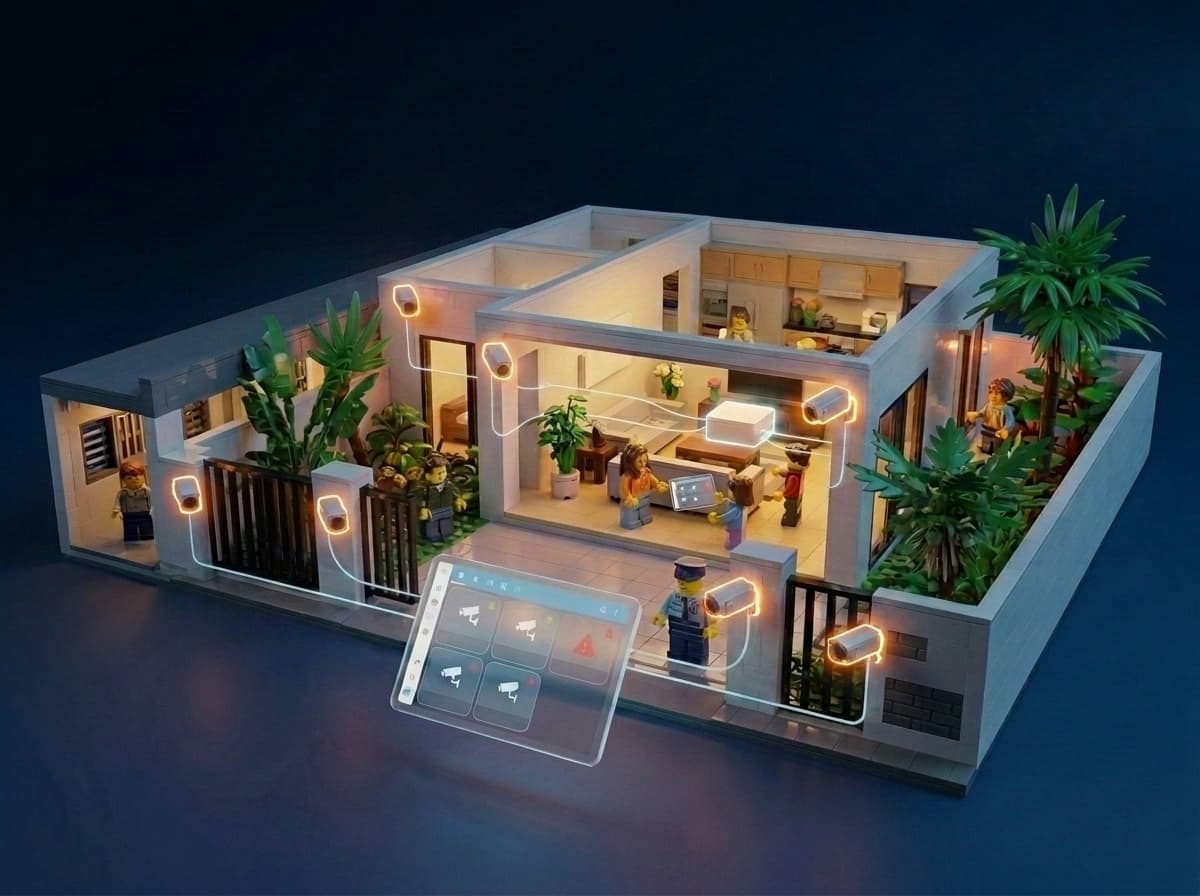
Home CCTV in Singapore: A Practical Setup Guide (and How It Works with Home Assistant)

Most home CCTV guides start with a list of cameras and their specs. This one starts a step earlier: what should the system actually do, how should it be built, and if you are also setting up a smart home, how do you make the two work together from the start rather than as an afterthought.
Quick Answer
- A well-structured home CCTV system has two layers: a recording layer (cameras feeding an NVR for local storage) and a smart home layer (those same cameras integrated into Home Assistant for live views and automations).
- Modern security cameras do more than record video. They detect people, vehicles, loitering, and zone crossings. When integrated into Home Assistant, those detections become automation triggers.
- PoE cameras are more reliable than WiFi for permanent home installations: always-on, stable connection, no battery to manage, and generally easier to integrate into Home Assistant.
- Before buying any camera system, verify how it integrates with Home Assistant. Battery cameras often need the brand's hub or NVR for HA access. Some cameras expose all AI detections as HA entities; others only offer a video stream.
- Plan cable routes during renovation. Running PoE cables to camera positions is straightforward when walls are open and becomes significantly harder after they are closed.
What modern cameras can actually do
It is worth establishing this upfront because it shapes how you think about the whole system.
Security cameras are no longer passive recording devices. Person and vehicle detection have become broadly standard even at mid-range price points. The camera's onboard chip distinguishes a person from a swaying tree or passing animal without sending anything to the cloud. More advanced detections are common in mid-range and prosumer cameras, though not universal at the budget end:
- People from animals or swaying trees (broadly standard)
- Vehicles from other motion (broadly standard)
- Someone lingering in a zone beyond a set duration (loitering detection, mid-range and above)
- A line being crossed (virtual tripwire, mid-range and above)
- Zone intrusion alerts
These capabilities are what separates a camera that records everything and buries you in footage from one that only flags what matters.
More importantly for a smart home setup: when a camera is properly integrated into Home Assistant, each of these detections becomes an entity in HA. A binary sensor that turns on when triggered. That sensor can then trigger any automation you care to build, from flipping lights on to sending a notification with a snapshot to your phone.
This is the foundation the rest of the article builds on.
Two layers, planned separately
The most common mistake in home CCTV planning is treating recording and smart home automation as the same problem. They are not. Setting them up as two complementary layers produces a more reliable system overall.
Layer 1: The recording system (NVR)
Cameras connect to an NVR (Network Video Recorder), which stores footage locally on a hard drive. The NVR handles continuous or motion-triggered recording, manages the cameras in its ecosystem, and provides a dedicated interface for reviewing footage. This layer works whether your internet is up or down, whether HA is running or restarting after an update.
Layer 2: The smart home layer (Home Assistant)
Those same cameras, or the NVR they connect to, are also integrated into Home Assistant. HA pulls live feeds for dashboards, receives detection events as entity states, and uses those states to trigger automations. This layer is about intelligence and action, not storage.
The distinction matters in practice. An NVR is built for footage review, timeline scrubbing, and long retention. Home Assistant is not. HA is built for automation logic. Using HA as your primary recording system is possible but it introduces dependencies that the NVR approach avoids cleanly.
When planning a smart home with clients, we always advise this two-layer approach. Our role in a CCTV setup is typically planning and advisory: discussing camera positions, LAN infrastructure or wiring requirements with the electrician, and helping the customer make informed hardware choices. Most customers source their own CCTV equipment and handle the physical installation with their contractor. During our smart home setup visit, we then help configure the full CCTV system alongside the HA integration, not just the HA side. Many clients are surprised by this; it is one of the less visible things we bring to a project.
The NVR: your recording backbone
An NVR is a dedicated device that receives video streams from cameras over your network and writes them to a hard drive continuously or on event. A few things worth understanding about why this matters:
Reliable, independent recording. The NVR records regardless of what else is happening on your network or your HA server. HA servers restart during updates. Internet connections drop. The NVR keeps recording through all of this.
Local storage, no subscription. Footage stays on your hard drive. You decide how long to keep it (days, weeks, months) based on the drive size. No monthly cloud fee, no footage disappearing when you stop paying. CCTV footage is among the most sensitive personal data a home generates. We have written about how data privacy and ownership work in a smart home context, and the principle applies especially here. We also cover why local control matters more broadly if you want the full picture on why keeping data on your own hardware is worth the upfront planning.
Built for footage review. NVR software interfaces are designed for exactly this: multi-camera grids, timeline scrubbing, event-based search, date filtering. This is what you want when you need to find a clip from three days ago. HA dashboards are not built for this and should not be used for it.
The bridge to Home Assistant. The NVR also does the heavy lifting of making camera streams accessible to HA via RTSP, ONVIF, or the brand's own integration API. This is how live feeds get into HA dashboards, and how detection events flow through to become HA automation triggers. In most consumer and prosumer setups, the AI processing that generates those detections happens at the camera level. The NVR receives the classified events, stores the associated clips, and routes the data to HA. Some prosumer NVRs from brands like Hikvision and Dahua can also run their own AI processing, useful for pairing with standard non-AI cameras, but camera-edge AI is the better and more common architecture. Either way, the NVR is the endpoint HA talks to.
The NVR is the foundation. Build it properly as a standalone system first. HA connects to it on top.
Integrating your cameras into Home Assistant
Once the recording layer is set up, the HA integration layer adds intelligence. There are two common paths.
Via the NVR's HA integration
If your cameras run through an NVR, the NVR brand typically has an HA integration (either official or a maintained HACS community repo). Live feeds and camera detection events travel through this integration into HA. The detections themselves originate from the cameras' onboard AI; the NVR integration is the pipeline. You integrate once at the NVR level, and all connected cameras come through.
Direct camera integration
Some cameras integrate into HA without an NVR, communicating directly over your local network via RTSP, ONVIF, or the brand's local API. Some brands have official HA integrations built into HA core; others require a community HACS repo; and some do not integrate at all. For a deeper explanation of what RTSP and ONVIF are and how they fit into a Home Assistant home, our smart home protocols guide covers the full picture.
What integration actually gives you
- Live camera feeds accessible in HA dashboards and the companion app
- Detection events (human, motion, loitering, vehicle) as HA entity states
- Those entity states available as triggers in any HA automation
- Camera snapshots attachable to push notifications
The question is not just whether a camera integrates with HA, but what it exposes when it does. Some integrations give you a live stream only. Others expose every detection event as a named entity. The difference between the two is significant when you start building automations.
To give you a sense of the landscape for Singapore homeowners, here is a quick map of how common brands sit on the integration spectrum:
- Reolink: official Works with Home Assistant certification (April 2025), native integration, full local control via RTSP/ONVIF
- Hikvision: native HA integration for cameras plus a community HACS addon for deeper doorbell and event support, all local
- Dahua: community HACS integration, supports motion and IVS events (tripwire, intrusion) locally via RTSP; also works with Amcrest cameras which are rebranded Dahua hardware
- UniFi Protect (Ubiquiti): official HA integration, fully local, but cameras must connect to a UniFi Protect NVR. You are buying into the UniFi ecosystem, not just the cameras
- TP-Link Tapo: requires a custom community HACS repo; some functions are kept proprietary within the Tapo ecosystem
- Xiaomi/Mi: official HA integration available but cloud-based by default; the community
hass-xiaomi-miotintegration supports local LAN mode on some models, though compatibility varies by model - Arlo, Ring, Google Nest: all route through their respective clouds; HA integration exists but local control is not possible with any of them
This is not an exhaustive list, and the integration quality for any brand can shift as firmware and community repos are updated. The principle that applies across all of them: check before you buy, not after.
The compatibility question to ask before you buy
Not all cameras integrate with HA equally, and some do not integrate at all. Before buying any camera or NVR:
- Does it integrate with Home Assistant, and is that integration official or community-maintained?
- If it is a battery camera, does it need the brand's hub or NVR for HA access? (Most battery cameras do, for the same power-saving reasons as battery doorbells. We covered this in detail in our video doorbell guide, and the same principle applies to battery CCTV cameras.)
- Does the integration expose AI detection events as HA entities, or only a video stream?
- For WiFi cameras specifically: does the integration depend on the brand's cloud staying online, or does it work locally? Why cloud-dependent smart home devices cause problems over time applies as much to cameras as it does to switches.
What becomes possible with CCTV in Home Assistant
Once cameras are integrated, they stop being passive recording devices and start participating in the wider smart home. Some practical examples:
Person detected, nobody home
When presence detection tells HA everyone is out and a camera detects a person at the gate or entrance, HA can trigger an immediate priority notification with a snapshot, turn on outdoor lights, and play an announcement. Useful for deliveries as much as security.
Loitering at entrance or gate
If someone remains in a camera zone beyond a set duration, HA triggers a response: lights on, speaker announcement, notification to your phone. This often resolves the situation without any confrontation.
Arrival routine from camera detection
Cameras positioned at a driveway or entrance can detect a returning car or family member. HA begins the arrival routine before anyone reaches the door: gate light on, aircon started, welcome announcement. When paired with a smart lock, the front door can be ready to unlock on approach. We cover the lock side of this in our smart lock guide. For building the full leave-home and arrive-home automation around cameras and sensors, we cover that in detail separately.
Night motion with nobody home
Motion or person detection indoors at night when presence says the house is empty triggers an immediate alert. HA can switch to a security profile, flash lights, trigger a siren, or send a notification depending on how you set it up.
Advanced: Vision LLM scene description
This one I run personally at home rather than as a standard LSHP installation. Frigate, a self-hosted NVR with local AI object detection that integrates with Home Assistant, handles camera AI detection. When a camera triggers a loitering event, Frigate captures a screenshot and sends it to a Vision LLM running locally on the same server. The LLM describes what it sees in natural language: not just "person detected" but a sentence describing the scene. That description, alongside the screenshot, gets pushed to my phone and announced across the Google Nest Minis at home.
This requires a capable HA server and meaningful configuration effort. It is not what we set up for every client, but it shows what the combination of local cameras, local AI, and HA makes possible. We have written more about running AI locally with Home Assistant for those interested.
Placement and setup considerations for Singapore
Coverage by property type
For HDB flats, the most common positions are the main door and the front gate. Some residents add a camera facing the corridor, which is permitted when the camera is placed inside the flat, but it must not point at a neighbour's door or windows. Cameras placed physically outside the flat in the corridor or any common area require written Town Council approval, a supporting police report, and are capped at a maximum of six months per approval. Cameras on the building facade are not permitted. If you are planning any camera position outside your flat's boundary, check with your Town Council before installing.
For condominiums, main door and car park level are typical. Some residents add a camera at the unit entrance. Check with building management before drilling into any shared facade.
For landed properties, coverage scales with the plot: front gate, driveway, car porch, and perimeter cameras depending on size and layout.
For a broader look at how smart home planning differs across Singapore property types, our guide to smart homes in HDB flats, condos, and landed properties covers the wider picture.
Wide lenses and neighbours
Most security cameras ship with wide-angle or fisheye lenses that can capture a very broad area. When positioning a camera, think about what else it picks up beyond your own property. As a matter of courtesy, try to angle cameras so they do not point directly into neighbouring homes or shared walkways where people would reasonably expect some degree of privacy. In Singapore, cameras that directly face a neighbour's home can also give rise to disputes under the Community Disputes Resolution Act. It is worth being thoughtful about camera angles at the planning stage rather than after installation.
PoE over WiFi for permanent installations
For any camera that will be mounted permanently, PoE is the stronger choice. A single ethernet cable carries both power and data, the camera is always on, and it does not compete with household WiFi or lose connectivity during a router restart. WiFi cameras are practical for temporary setups or positions where running a cable is genuinely not feasible, but for a permanent home system they introduce unnecessary variables.
Plan cable routes during renovation
PoE cameras need a network cable run to each position. This is the same principle from our doorbell guide, applied at scale across multiple camera positions. During renovation, with walls open and conduits being laid, this is straightforward work. After renovation, it requires more effort and may involve visible cable trunking depending on the route. If a renovation is coming up, plan camera positions now and include the cable routes in the brief to your electrician.
What to check before you buy
Run through these before committing to any camera or NVR brand:
For cameras:
- Does it integrate with Home Assistant? Is the integration official (HA core) or community HACS?
- Is the integration actively maintained, or fragile and sporadically updated?
- Does it expose AI detection events as HA entities, or only a video stream?
- If it is a battery camera, does it need the brand's hub or NVR for HA access?
- PoE or WiFi, and if WiFi, does it still function and record if the internet goes down?
For NVRs:
- Does the NVR brand have a stable HA integration?
- Does the integration bring through camera detection events, or only live streams?
- Is the storage expandable as your camera count grows?
These questions apply regardless of brand. The answers are what matter.
FAQ
Do I need an NVR, or can I just use Home Assistant for recording?
An NVR is strongly recommended as the recording layer. Home Assistant is built for automation logic, not continuous video recording. An NVR records reliably whether HA is running or not, stores footage on a dedicated hard drive, and provides a proper interface for reviewing clips. HA then integrates with the NVR to add automations and live views on top. Using HA as your primary recorder introduces unnecessary dependencies and is not how HA is designed to be used.
What is Frigate and do I need it?
Frigate is a self-hosted NVR with local AI object detection that integrates with Home Assistant. It handles camera stream management and object detection entirely on your own hardware with no cloud dependency. It is not required for a CCTV setup: most modern cameras have onboard AI detection that surfaces as HA entities without Frigate. Frigate becomes relevant if you want centralised local AI processing across cameras from different brands, or if you want to add a Vision LLM layer for richer scene descriptions. For most home installations, the cameras' native detection paired with an NVR integration is sufficient.
My cameras have their own app. Why would I bother integrating them into Home Assistant?
The camera app handles device configuration and footage review well. What it cannot do is connect your cameras to the rest of your home. HA integration means a person detected at the gate can trigger your outdoor lights, send you a snapshot notification, unlock the front door for a recognised family member, or announce a visitor over your home speakers. None of that is possible when the cameras live only in their own app.
Do I need to run new cables if I already have WiFi cameras?
Not necessarily, but it is worth thinking through before your next renovation. WiFi cameras are usable and work for many setups. The limitations are connection stability and sensitivity to router issues. On the AI question: the detection itself (person, vehicle) typically runs on the camera's own chip regardless of internet, but some WiFi camera brands route their Home Assistant integration through the manufacturer's cloud, meaning HA automations can break when the cloud is unavailable even if the camera is still detecting locally. If you have an upcoming renovation, adding PoE cable runs to planned camera positions is low-cost work that gives you better long-term options, even if you do not switch to PoE cameras immediately.
How do I know if a camera will integrate properly with Home Assistant?
Check the Home Assistant integrations directory for an official integration first. If nothing appears there, search the HACS community repository. Check the GitHub activity on any community integration: a repo with recent commits and active issues is healthier than one untouched for two years. For NVRs specifically, most major brands have either official or community integrations. The key question beyond compatibility is whether the integration exposes AI detection events as HA entities, or only provides a video stream. That distinction determines what automations you can build.
Planning a home CCTV system in Singapore?
We help Singapore homeowners set up CCTV that integrates properly with their smart home. Tell us about your property and what you are trying to achieve.
Talk to us