
Planning a Smart Home for Your Landed Property in Singapore: A Pre-Renovation Guide

If you're renovating a landed property in Singapore, you're in a different position from most other homeowners doing a smart home setup. You own the structure, so you can actually hack walls, run new cabling, and plan electrical work properly, instead of working around what a previous owner or the HDB/condo developer left behind. But that also means the decisions you make before the contractor starts are much harder (and more expensive) to undo later.
Quick Answer
- Decide your network backbone before renovation starts. Running Cat6 Ethernet to every floor and AP location while walls are open is far cheaper than retrofitting it later.
- Plan neutral wiring at every switch point during the electrical stage, even for switches you don't plan to make "smart" immediately.
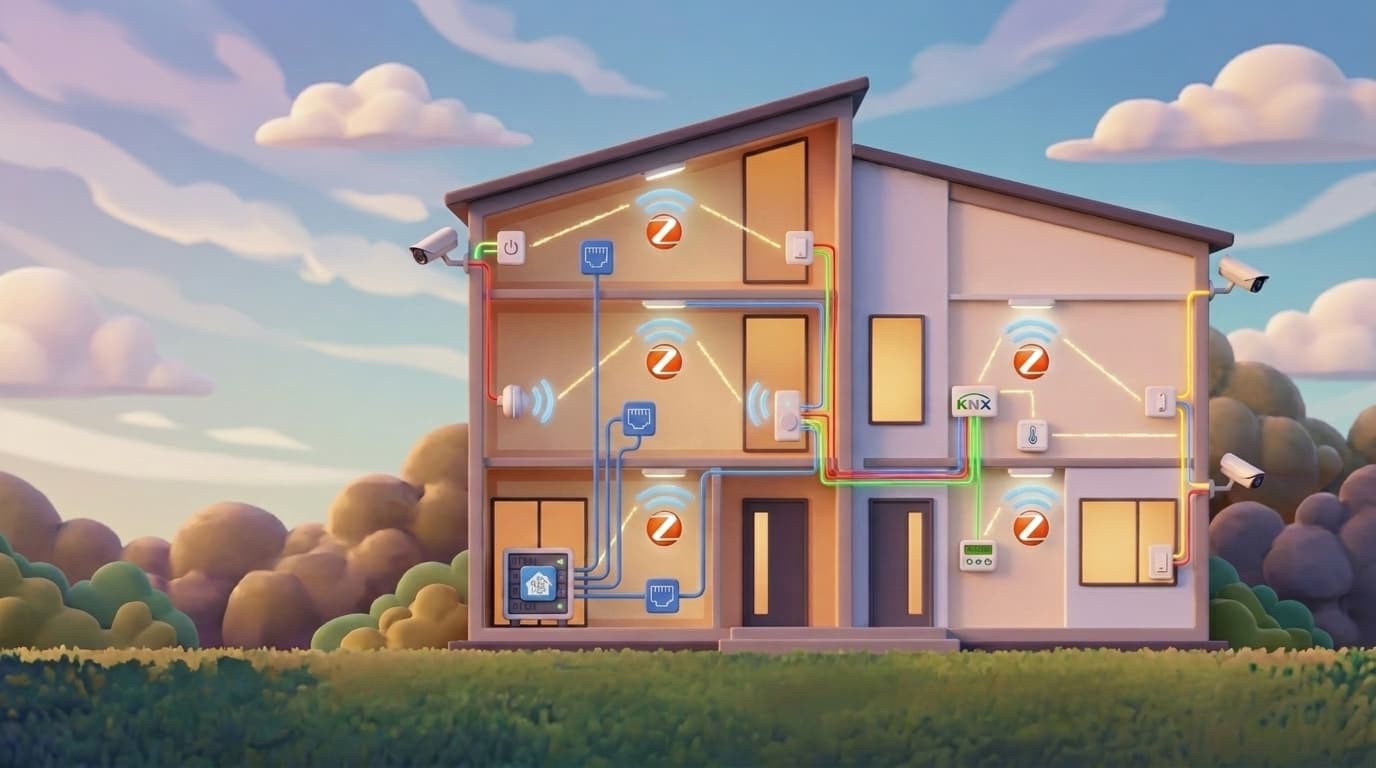
- For multi-storey landed homes, a wireless mesh (Zigbee or Z-Wave) backed by wired Ethernet access points is usually enough; KNX is a wired, hardwired-at-renovation option worth considering if you want maximum reliability and are doing major electrical works anyway.
- Layman Smart Home works primarily with Home Assistant and wireless protocols (Zigbee, Z-Wave, Wi-Fi, Matter). If you're set on a KNX backbone, you'll need a certified KNX integrator for the wired installation; we can still bring that system into Home Assistant for the automation and dashboard layer on top.
- A separate IoT network (its own SSID or VLAN) and PoE for cameras keeps your main household Wi-Fi from getting congested as you add devices.
1. Why Landed Properties Are a Different Planning Problem
In an HDB flat or condo, you're usually working within a fixed floor plan and limited ability to change the building's electrical infrastructure. A landed property removes most of those constraints, but it adds new ones: multiple storeys, longer cable runs, thicker walls between floors, larger perimeters to secure, and (often) a basement or roof that needs coverage too.
The result is that decisions which barely matter in a single-floor flat, like where your network cabinet sits, or whether a wall has conduit for future cabling, become much bigger decisions in a landed home. Get them wrong and you're either drilling through finished walls again or stuck patching coverage gaps with extra hardware indefinitely.
If you're still deciding whether your property type even needs this level of planning, our HDB/condo vs landed comparison covers that first.
2. Electrical and Renovation Planning: Get This Right Before Walls Close Up
This is the stage where mistakes are the most expensive to fix, because once the plastering and painting is done, you're not opening that wall again without real cost and mess.
- Neutral wire at every switch point. Many smart switches need a neutral wire to power themselves; older installations and some loop-in wiring configurations don't have one at the switch. During a full renovation, this is the easiest moment to ensure every switch location has a neutral wire run to it, even ones you don't plan to convert to "smart" right away. We've covered this in more detail in our neutral vs no-neutral wiring guide.
- Conduit and trunking for future cabling. Concealed conduit (empty "draw-in" pipes) from your distribution board to key locations (TV console, study, each floor's network point, gate/driveway) lets you pull new cables later without breaking open walls again.
- A dedicated spot for your network/server cabinet. Landed homes usually have room for a proper network cabinet or shelf, near your distribution board or a study, where your router, switches, Home Assistant server, and any NVR for cameras can sit together with proper ventilation and a UPS.
- Cable runs planned per floor, not just per room. In a multi-storey home, plan your Ethernet and low-voltage cable runs floor by floor: where each floor's access point will sit, where camera cabling needs to reach (eaves, gate, driveway, back door), and how those runs get back to your central cabinet.
3. Build the Wired Network Backbone First
Wireless protocols (Zigbee, Z-Wave, Wi-Fi, Matter) all still depend on a solid wired backbone behind them in a landed property. Concrete floors between storeys and long distances from your router mean a single Wi-Fi router will not reliably cover a 3-storey terrace or bungalow.
- Run Ethernet (Cat6 or better) to every floor, terminating at a planned access point location, while the walls are open during renovation. This is far cheaper than retrofitting it after the fact.
- Use PoE (Power over Ethernet) for cameras and access points where possible. It avoids extra power sockets at awkward locations like eaves or gate pillars, and keeps camera footage off a congested Wi-Fi network.
- Separate your IoT devices from your main household Wi-Fi, either with a dedicated SSID or a separate VLAN if your router supports it. This stops a flood of smart switches and sensors from competing with everyday browsing and streaming for bandwidth, and it also limits what a compromised IoT device can reach on your network, see our smart home cybersecurity guide for more on that.
- Don't lean on Wi-Fi alone for whole-home coverage. Wi-Fi-only smart devices are convenient to start with, but in a large, multi-storey home they're the first things to drop offline; our guide to why Wi-Fi-only smart homes struggle covers why a wired backbone and mesh protocols matter more as a home gets bigger.
4. Choosing Your Protocol: Wireless Mesh or KNX
This is the decision landed property owners ask us about most, because landed homes are exactly the case where KNX gets considered as an alternative to wireless.
Wireless mesh (Zigbee/Z-Wave) backed by wired access points. This is the approach we work with directly. Zigbee and Z-Wave devices form a mesh network, where switches and plugs repeat the signal to each other, so coverage improves as you add more devices. Paired with wired access points on each floor (from the backbone you ran in renovation), this comfortably covers most landed homes, and it integrates cleanly with Home Assistant.
KNX. KNX is a wired, hardwired-at-installation building automation standard that's been used in commercial and high-end residential projects for decades. Because every device is hardwired rather than relying on radio signals, it's extremely reliable and doesn't have the 2.4GHz interference concerns that wireless protocols can run into. The tradeoff is cost and timing: KNX wiring has to be planned and installed during your electrical works, by a certified KNX integrator, and retrofitting it afterward is essentially a full rewiring job.
To be upfront about where we fit in: Layman Smart Home works primarily with Home Assistant and wireless protocols. If you decide to go the KNX route, you'll need a certified KNX integrator to handle the wired installation itself. We can then bring that KNX system into Home Assistant via a KNX-IP interface, so you get a single dashboard and automation layer across KNX and any wireless devices you add later, rather than juggling separate apps.
If you're unsure which way to go, our broader smart home protocols guide walks through how Zigbee, Z-Wave, Wi-Fi, and Matter compare.
5. Hardware to Shortlist for a Landed Property
These are the categories that come up most often once you move past switches and sensors into landed-specific coverage.
- Outdoor and perimeter cameras. Reolink's PoE camera range covers gate, driveway, and perimeter monitoring well, and some models include built-in vehicle detection, useful if you want arrival automations tied to your car specifically rather than any motion.
- Gate and garage automation. A Shelly 1 Gen4 Zigbee dry contact relay can bridge an existing motorised gate or garage door opener into your Zigbee network, so it's controllable and automatable from Home Assistant alongside everything else.
- Multi-floor mesh coverage. Aqara H1 neutral Zigbee switches (around S$60 to S$80 per unit) double as repeaters, so placing them at staircases and each floor strengthens your Zigbee mesh while also giving you smart lighting control at those points.
- Multi-zone air-con control. For Mitsubishi Electric Starmex units, we've developed a custom ESPHome-based control chip that integrates natively for local, cloud-free control. Mitsubishi Heavy Industries and Daikin also have smart-capable models that integrate well; which is the right fit depends on your home's aircon layout.
- Water leak detection. IKEA, Aqara, or Sonoff Zigbee water leak sensors are all suitable for pump rooms, ground floor areas, and laundry spaces prone to leaks.
- Energy monitoring. Shelly's energy monitoring clamps at your distribution board let you track power draw per circuit, useful in a landed home where floors or zones can have very different loads.
- Perimeter motion sensors and irrigation controllers are two categories worth planning cable runs and mounting points for, even if you haven't picked a specific product yet. Our presence sensor guide covers what to look for in motion and presence detection generally.
- UPS for your network and Home Assistant server. A short power blip shouldn't take down your locks, cameras, and automations all at once. A UPS on your network cabinet keeps the core system running through brief outages.
6. Automations Worth Planning For
Once the hardware above is in place, here are the automations that tend to matter most for a landed property specifically.
- Vehicle arrival alerts and gate access. A Reolink driveway camera with vehicle detection can notify you when your car pulls in, and trigger the Shelly-controlled gate or garage to open automatically.
- Perimeter lighting at night. Camera or motion-based detection at the gate and driveway can switch on exterior lighting automatically after dark, rather than running on a fixed timer regardless of whether anyone's there.
- Multi-zone air-con scheduling. Pre-cool bedrooms shortly before bedtime and ease off air-con in guest rooms or studies that see less use, using whichever control module fits your aircon brand.
- Leak alerts. A water leak sensor at the pump room, ground floor, or laundry area can send an immediate notification the moment moisture is detected, well before it becomes visible damage.
- Per-floor energy visibility. With Shelly energy clamps at the distribution board, a dashboard view of consumption by floor or circuit makes it easier to spot an aircon unit or appliance drawing unusually high power.
- Multi-floor presence lighting. Aqara H1 switches combined with motion sensors at staircases and corridors mean lighting follows people through the house rather than staying on in empty floors.
- Leave-home and arrival routines. Combine gate/vehicle detection, door locks, and lighting so leaving the house arms cameras and switches off non-essential appliances, while arriving home unlocks, disarms, and turns on entry lighting. See our leave-home automation strategies guide for more detail on building this out.
7. Sequencing: What to Decide Before Renovation Starts
- Before electrical works begin: Confirm neutral wiring at every switch, conduit/trunking routes, network cabinet location, and your protocol direction (wireless mesh vs KNX), since this determines what gets wired in.
- During renovation: Run Ethernet to every floor and key device locations, install conduit for cable runs you haven't decided on yet, and set up your network cabinet.
- After renovation, before move-in: Install your Home Assistant server, configure your network (main Wi-Fi, IoT SSID/VLAN), and start with core devices, locks, switches, key sensors.
- After move-in: Add cameras, air-con automation, curtains, and refine automations as you understand how you actually use the house.
8. How We Work With You From Planning to Move-In
When a landed property client commits to working with us, we end up functioning less like a vendor and more like an objective partner throughout the renovation, someone the client can lean on for advice at any stage without us having a brand or product to push.
Before renovation: We sit down and go through what kind of smart home outcome you actually want, whether it's realistic, and how to get there. Out of that, we typically put together a hardware list with rough costings, so you're planning your budget against real numbers instead of guessing. If you want a sense of typical figures before that conversation, our smart home cost guide and budget checklist are good starting points.
During renovation: This is where we add the most value for landed property owners specifically. When your electrician does the site visit to map out electrical works, we step in to front that conversation. We talk through the wiring requirements directly with the electrician, whether your smart switches need a neutral wire and deeper mounting boxes, what type of LED strips you're planning so the core wiring is prepped correctly (different load types need different wiring), what smart lighting you intend to use, and whether triac dimmer control modules need to be wired in. Most clients aren't electrically savvy and have no idea what the electrician is actually doing at this stage. We act as the bridge so you actually get what you asked for, rather than finding out after the walls are closed up that something wasn't wired the way your smart home setup needs.
After renovation: Once the renovation itself is done, we come in to do the actual Home Assistant setup and integration work.
Throughout the whole journey, we stay in touch and are happy to weigh in whenever you're deciding on a specific device or brand. Since we don't manufacture or sell any particular brand's products, our opinion on what to buy is genuinely ours, not a sales pitch.
FAQ
Is KNX better than Zigbee for a landed property?
Neither is universally "better." KNX is wired and extremely reliable but must be installed during renovation by a certified KNX integrator, costing more upfront. Zigbee is wireless, mesh-based, easier to expand or change later, and works well in landed homes when backed by a wired Ethernet backbone for access points.
Does Layman Smart Home install KNX systems?
No. We work primarily with Home Assistant and wireless protocols (Zigbee, Z-Wave, Wi-Fi, Matter). If you choose KNX, a certified KNX integrator handles the wired installation, and we can integrate that system into Home Assistant for unified automation and dashboards.
What's the single most important thing to plan before renovation?
Your network backbone and neutral wiring. Running Ethernet to every floor and ensuring neutral wire at every switch point are both far cheaper to do while walls are open than to retrofit afterward.
Can I still add a smart home system if I've already finished renovating?
Yes, but your options narrow to wireless protocols and battery-powered devices at locations without existing cabling, since opening finished walls for new wiring is costly. Planning ahead of renovation gives you more flexibility, including wired options.
Do I need a separate Wi-Fi network for my smart home devices?
It's not mandatory, but a dedicated IoT SSID or VLAN prevents a growing number of smart switches and sensors from competing with your household's everyday internet use for bandwidth.
Planning a landed property renovation?
Talk to us before your electrical works start, so your wiring, network, and protocol choices are right from day one.
Plan my landed property smart home