
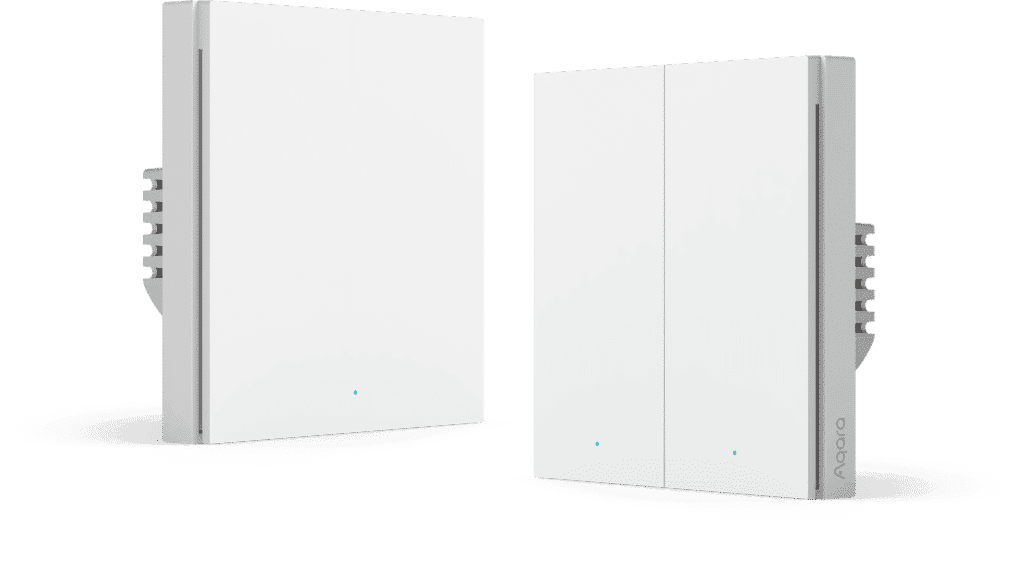
Aqara H1 Smart Switch: The Switch We Install in Over 80% of Our Projects

When clients ask us what smart switch to get, the answer is almost always the Aqara H1. Over the past couple of years, we have installed it in more than 80% of our Home Assistant projects. Not because it is the cheapest on the market, and not because it is top-of-the-line premium -- but because it consistently does what a smart switch needs to do: work reliably, day after day, without drama.
If you are renovating and trying to figure out which Zigbee switch to specify, here is our honest take.
Quick Answer
- The Aqara H1 is the Zigbee smart switch we install in over 80% of our Home Assistant projects, mainly for its reliability and build quality.
- It comes in neutral and no-neutral variants — pick based on your home's wiring; only the neutral version can act as a Zigbee router.
- Connected to Home Assistant (not just the Aqara app), each button supports single, double, long-hold, and multi-button press combos, unlocking automations the stock app can't.
- Needs a switch box with at least 45mm depth; budget around S$60–S$80 SGD per unit in Singapore.
What Is the Aqara H1?
The Aqara H1 is a Zigbee wall switch available in 1-gang, 2-gang, and 3-gang configurations. It comes in two electrical variants -- neutral and no-neutral -- to cover different home wiring setups.
In Singapore, pricing typically works out to around $60 to $80 SGD for a single unit depending on the gang count and variant, and you can find them on Shopee and Lazada.
A Build Quality You Can Actually Feel
One of the first things we notice when handling the H1 is the switch action. The rocker clicks with a satisfying firmness, and the chassis feels solid in your hand. The internal components are well put together for the price point.
Compare that to some of the budget Zigbee switches on the market -- ones that flex when pressed, or feel hollow like a cheap toy -- and the difference is obvious. It does not feel like something that will need replacing two years down the road.
The Main Reason We Keep Recommending It: Reliability
If there is one thing that made the Aqara H1 our default choice, it is this: once it is in the Zigbee network, it stays there.
It does not randomly appear as "Unavailable" in Home Assistant for no reason. It does not need to be re-paired every few months. You set it up, and it sits in the wall doing its job quietly.
We have used the Sonoff ZBM5 on some jobs as well -- it is cheaper, and for basic use cases it works fine. But we have seen it occasionally drop offline for no apparent reason in a way the H1 simply does not. When you are building automations around a switch, that predictability matters a lot.
The Features You Did Not Know It Had
Here is the part that surprises most of our clients when we first demo it.
The Aqara H1, when integrated with Home Assistant, does not just turn lights on and off. Each physical button can respond differently depending on how you press it -- a single press, a double press, a long hold, or even pressing two buttons on the same switch at the same time. Each of those interactions is a separate trigger that you can assign to any automation you like.
The Aqara app alone does not expose most of these. You only get access to all of them when you connect the switch to Home Assistant via Zigbee. On a 3-gang switch, the number of possible triggers gets quite generous -- each of the three buttons individually, plus combinations.
Here are two automations that we actually run ourselves:
- Pressing left and right buttons simultaneously on a 2-gang H1 triggers a "leaving home" routine that turns off every light, air-con, and device in the house. One press at the door on the way out.
- Double-pressing the left button on a bathroom switch starts "toilet venting mode" -- the exhaust fan runs for 20 minutes and shuts off automatically.
Neither of these is something you can do through the standard Aqara app. They become available once the switch is talking to Home Assistant.
Things to Know Before You Buy
Neutral vs No-Neutral
Aqara makes the H1 in both neutral and no-neutral versions. Which one you need depends entirely on your home wiring.
Newer HDB flats typically have a neutral wire run to each switch point; older resale units may not. If you are doing a full renovation, it is worth getting your electrician to pull neutral wires to all switch boxes -- this gives you the most flexibility. If you are doing a lighter retrofit, the no-neutral version is a legitimate option.
For more detail on this topic, see our post on neutral vs no-neutral wiring for smart switches.
One additional note: the no-neutral version cannot act as a Zigbee router. In a Zigbee mesh network, powered devices can relay signals from other devices, extending the network's reach. The neutral H1 can do this; the no-neutral version cannot. For most homes this is not a dealbreaker, but it is worth understanding if you are designing a larger installation.
Box Depth
The H1 is thicker than a standard dumb switch. It needs a mounting box with at least 45mm of depth to sit properly without cramping the wires. For a new renovation, just inform your contractor or ID up front. For a retrofit, check the depth of your existing switch boxes before purchasing.
How It Compares to the Alternatives
Within the Aqara switch range, the D1 is a solid option and we have used it. But at current Singapore pricing, the H1 is competitive enough that the small price gap rarely makes the D1 the obvious choice.
The Z1 and Z1 Pro are similar in quality to the H1, comes in optional neutral and non-neutral. It also drops multi-click triggers on the relay gangs (the 4 gang scene switch still does multi-click triggers). It does not function as a Zigbee router - we are leaning towards the H1 solely based on this fact.
The Sonoff ZBM5 is the budget pick. If cost is the main concern, it is usable. But from our experience across multiple projects, the H1's stability and build quality justify the modest price difference.
Our Take
For anyone renovating now and wanting a dependable, value-for-money Zigbee smart switch to run with Home Assistant, the Aqara H1 is where we would start. The build holds up, it stays online, and the additional triggers you unlock through Home Assistant turn a plain wall switch into something genuinely useful. If a switch in your home is not staying online, that is usually a mesh or firmware issue rather than the hardware itself, and we cover how we diagnose that in our Aqara troubleshooting guide.
Before purchasing, confirm your wiring type (neutral or no-neutral), brief your contractor on the 45mm box depth requirement, and you should be set.
FAQ
Should I get the neutral or no-neutral version?
It depends on your wiring. If renovating, get your electrician to pull neutral wires for the most flexibility. If retrofitting, the no-neutral version is a legitimate option if your switch boxes do not have neutral wires.
Does the no-neutral version have any downsides beyond wiring compatibility?
Yes. The no-neutral H1 cannot act as a Zigbee router, so it won't relay signal to extend your mesh network the way the neutral version can.
What's the price in Singapore?
Around S$60 to S$80 SGD per unit depending on gang count and variant, available on Shopee and Lazada.
How does it compare to the Aqara D1 or Sonoff ZBM5?
The D1 is solid but rarely cheap enough to beat the H1. The Z1 Pro drops decoupled multi-clicks on some of the gangs, which is a staple and highlight feature of the H1, and is not a Zigbee router. The Sonoff ZBM5 is the budget pick but has occasionally dropped offline in our experience, unlike the H1.
Not sure which switch is right for your home?
We specify and install smart switches for HDB, condo, and landed properties across Singapore. Get in touch and we can advise you on the right setup for your wiring.
Talk to us about your renovation