
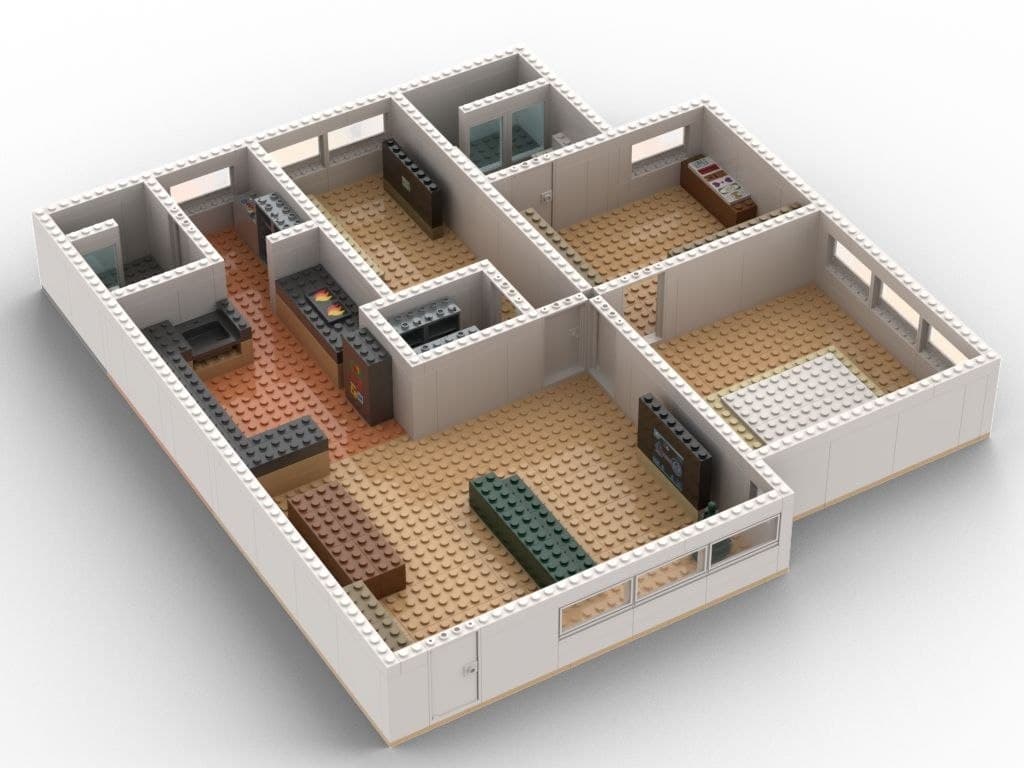
Why Custom Floorplan Dashboards Make Home Assistant So Much Better to Use

Most smart home dashboards are functional, but not everyone at home is a tech person. The buttons and controls are all there. For less techy family members, it can still feel like operating software instead of managing a home.
Visual, spatial home control is not new. In the industry, this falls under HMI (Human-Machine Interface). Premium home automation systems have offered this in high-end homes for years, but those setups typically come with proprietary hardware, dealer-only programming, and service calls for even small UI changes.
With Home Assistant, we can offer that same kind of user experience, or UX for short. It's how your dashboard looks, feels, and works when you actually use it.
That's why we're excited to introduce custom Home Assistant floorplan dashboards 🎉
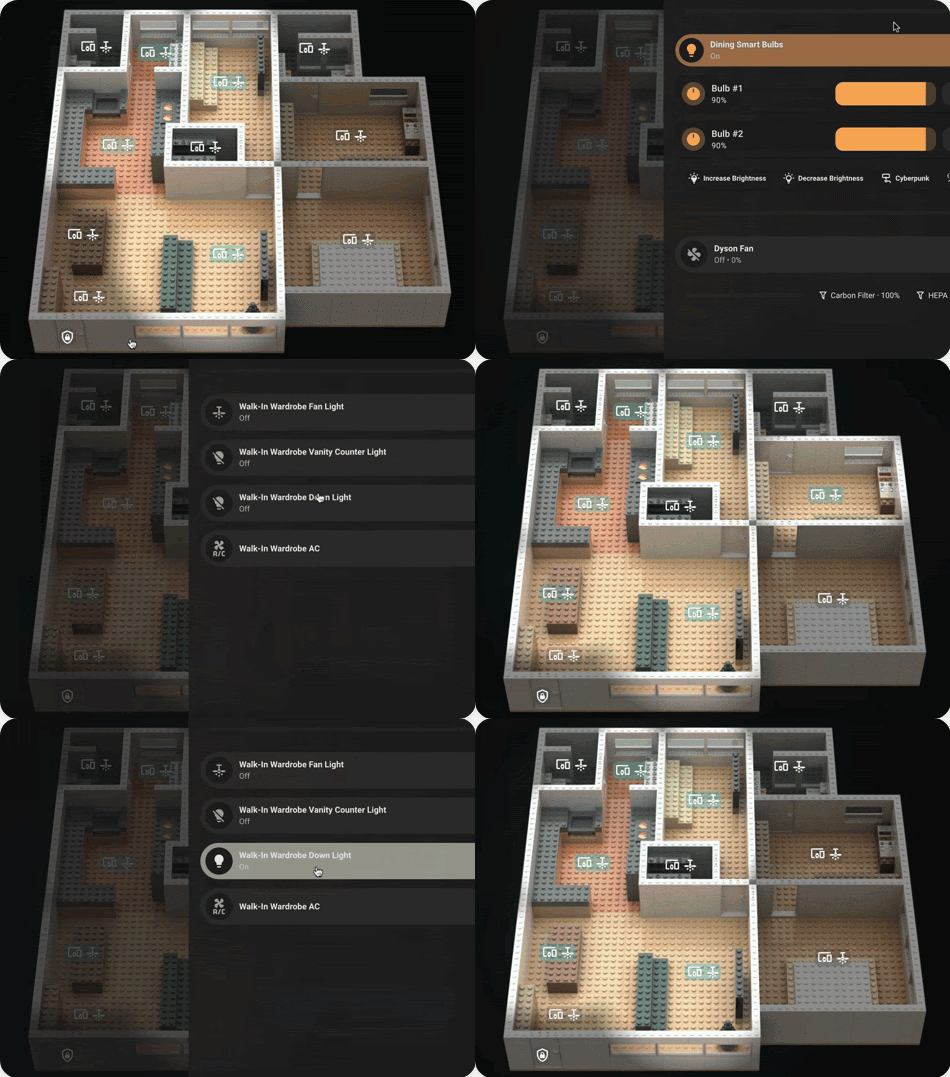
This took a lot of work to get just right. It's a new optional add-on to our integration work. Instead of the usual cards and buttons, you control your home through a visual layout of your actual floorplan.
Quick Answer
- Custom floorplan dashboards are a new optional add-on that replace standard cards and buttons with a visual layout of your actual home — tap a room to control it.
- Available in isometric, flat 2D, or custom-art styles; Lego-style isometric is our specialty and what we've delivered so far.
- The work has two parts, floorplan design/rendering and Home Assistant dashboard configuration, and you can supply your own artwork to skip the design step.
- Best suited to homeowners who want a tailored experience, not a quick one-click template; bigger homes mean more design and setup work.
What We Are Offering
We build customised floorplan dashboards for Home Assistant, designed around your home's actual layout and your daily routines. Because it's built on Home Assistant, it's more accessible, there's no vendor lock-in, and you have full flexibility to update, expand, or redesign it down the road.
The floorplan can take different visual styles depending on what you prefer:
- Isometric view (usually the most popular visually)
- Flat top-down 2D view (usually the most functional)
- Other creative styles if you can provide the artwork
Our speciality is Lego-style floorplans, and that's what we've delivered so far. If you have a different style in mind with artwork ready, we can handle the Home Assistant dashboard setup for that too.
What's Different About Using One?
A floorplan dashboard changes how you interact with your smart home, especially on tablets and wall displays.
1. Navigate your home visually
You see your actual home layout on screen and tap into whichever room you want to control. Lights, aircon, and media controls are grouped by where they physically sit in your home, not by device type. For people who think spatially, this just makes sense.
2. See your home's status at a glance
Lights on, temperatures, sensor states, all overlaid on the floorplan. Everything is visible in one view. On a wall tablet, it doubles as a live status display for your home. This supports the kind of smart home experience some of our clients have been looking for.
3. Intuitive for everyone
Family members, helpers, and guests who are new to the space can use it without explanation. "Tap the kitchen to control the kitchen" makes sense to most people. "The design is very human."
How We Build It
This is not a DIY tutorial article, because each floorplan project is highly customised and effort-intensive.
In practice, this work has two main parts:
- Floorplan design and rendering
- Configuration and setup inside Home Assistant
If you already have a floorplan design ready, we can focus on the Home Assistant dashboard setup. If you don't have one, we can design and render a Lego-style home view, then build the whole thing for you.
This is available as an optional add-on for both:
- Full smart home integration projects
- Existing Home Assistant homes that want a completely different way to use their setup without redoing the entire system
Honest Notes Before You Decide
Custom floorplan dashboards take real effort.
The work is intensive across design, rendering, dashboard setup, and visual styling. Bigger homes mean more work, with more zones, more states, and more to set up.
So this is best for homeowners who want something truly tailored, not a fast one-click template.
If you're still at the planning stage, it helps to get your base setup right first, with reliable Zigbee architecture and practical automations, before adding a custom dashboard on top. And if you're comparing smart home platforms, there's a reason we build exclusively on Home Assistant over Tuya and similar cloud-based options.
FAQ
Can I get a floorplan dashboard without a full Home Assistant integration project?
Yes. It's available both as part of a full integration project and as an add-on for existing Home Assistant homes that want a different way to use their current setup.
What if I already have my own floorplan artwork?
We can skip the design phase and focus purely on the Home Assistant dashboard configuration.
Is this a quick DIY-style template?
No. Each floorplan is custom-built around your actual layout and routines, so it takes real design and setup effort, especially for bigger homes with more rooms and zones.
Should I set this up before or after my base automations?
After. We recommend getting a reliable Zigbee setup and your core automations working first, then adding the floorplan dashboard on top.
Want a custom floorplan dashboard for your Home Assistant setup?
We can design and implement a tailored floorplan dashboard that matches your home layout and daily routines, from practical 2D views to Lego-style visual themes.
Plan your dashboard with us